
Envelopes
Use the Envelopes page, reachable from the sidebar, to set money aside for expenses that do not come every month: an annual insurance, a quarterly tax, a holiday.
Creating an envelope
Section titled “Creating an envelope”Set the following for an envelope:
- A name.
- An Amount due greater than zero.
- A Due date.
- An optional Repeats every (months), from 1 to 120 (for example 12 for a yearly expense). Without it, the envelope is one-time.
- An optional color.
Adding money
Section titled “Adding money”Use Add money to record an amount you set aside for an envelope. Amounts are signed: a positive amount puts money in, a negative amount takes money back out. An envelope’s funded amount is the sum of everything recorded on it, and the remaining amount is the target minus the funded amount.
Suggested monthly amount
Section titled “Suggested monthly amount”Each envelope shows how much to set aside each month: the remaining amount divided by the months left until the due date. A month that has already started counts as a whole month. Once the due date is reached or passed, the suggestion is the whole remaining amount, now.
Pay schedules
Section titled “Pay schedules”A pay schedule says when you get paid. It holds dates only, never an amount, and it is what lets an envelope or a goal show how much to set aside each payday.
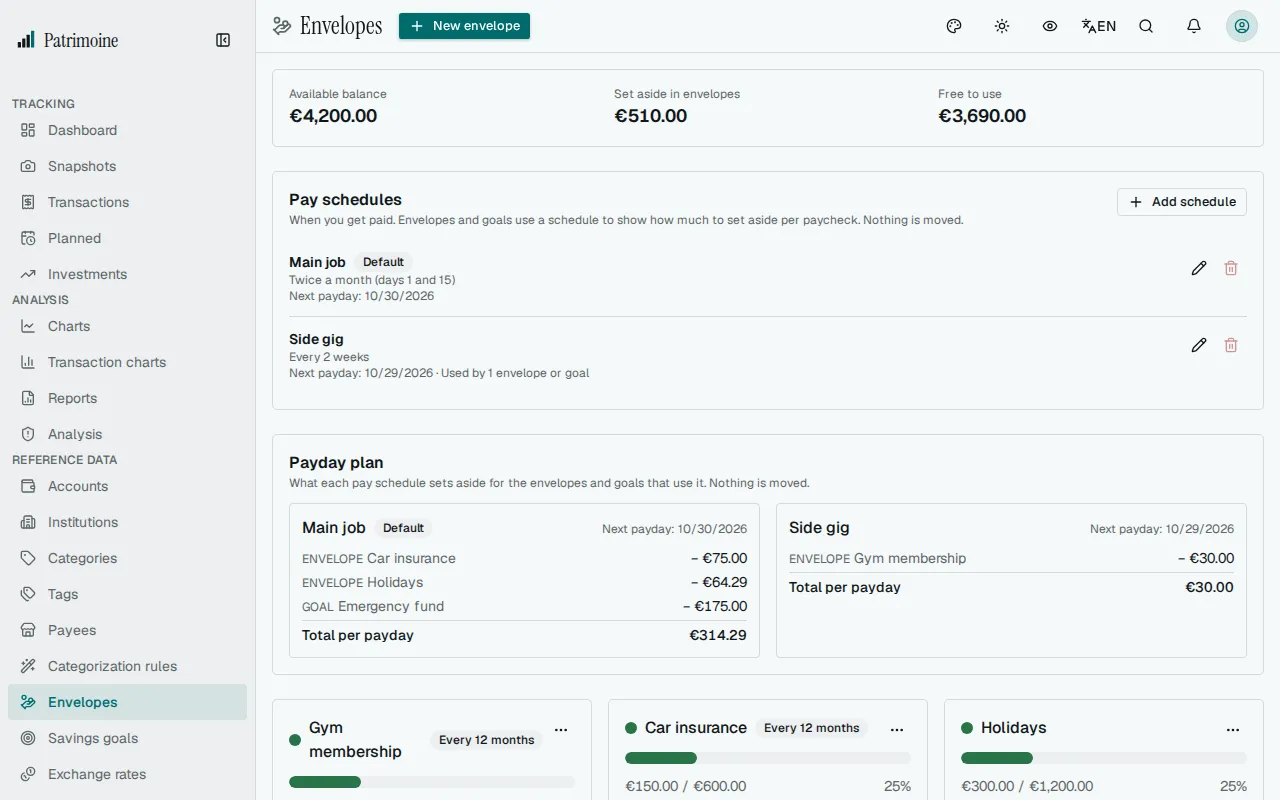
Manage your schedules in the Pay schedules block of the Envelopes page, between the Free to use figures and the Payday plan. It lists every schedule with how often you are paid, its next payday and how many envelopes and goals use it. Use Add schedule to create one, or the pencil on a row to edit it.
For each schedule, set:
- A name, for example Main job.
- How often you are paid: every week, every 2 weeks, twice a month (you also enter the day of the second payday) or once a month. A schedule carried over from a planned income may show another repeat, such as every 3 months. It keeps working as it is until you pick one of the four choices.
- A payday date: any payday, past or coming. The later paydays follow from it.
- What happens on weekends: keep the date, move to the Friday before or move to the Monday after. Only the payday moves; the schedule still repeats from the original date.
- Whether it is your default schedule. Envelopes and goals without a schedule of their own use it. Only one schedule is the default: choosing another one replaces it.
A schedule cannot be deleted while it is your default schedule or while envelopes or goals use it. Its delete button is greyed out and gives the reason: choose another default, or another schedule for those envelopes and goals, first.
Suggested amount per payday
Section titled “Suggested amount per payday”If you set money aside when you are paid, give the envelope a pay schedule: pick one under Paycheck schedule when you create or edit the envelope, or choose New schedule to create one without leaving the form. An envelope without a schedule of its own uses your default schedule. The envelope then also shows how much to set aside each payday: the remaining amount divided by the number of paydays between today and the due date, as worked out from the schedule. The schedule’s weekend rule is taken into account.
In the New schedule window, give the schedule a name, choose how often you are paid (every week, every 2 weeks, twice a month or once a month), enter any payday (past or coming; the later paydays follow from it), choose what happens on weekends and, if you want, use it as your default schedule.
- A pay schedule holds dates only, never an amount, and only changes what is displayed: nothing is posted and no money moves.
- Without a schedule (and without a default schedule), or when no payday is left before the due date, only the suggested monthly amount is shown.
- A schedule that envelopes or goals use cannot be deleted.
Payday plan
Section titled “Payday plan”Once at least one envelope or goal uses a pay schedule, a Payday plan block appears above the envelopes. It shows one block per pay schedule that envelopes or goals use, with the date of its next payday, what every envelope and goal on it asks to set aside per payday, and the total per payday. A schedule carries no amount, so the plan shows no income and no leftover. Envelopes and goals without a schedule of their own appear under your default schedule; a goal without a deadline appears only when it picked the schedule itself.
- It is a read-only view: nothing is posted and no money moves.
- Archived envelopes and goals are not included.
- The figures are the same per-payday amounts shown on each envelope and goal, so the plan and the cards always agree.
Marking an envelope as paid
Section titled “Marking an envelope as paid”Use Mark paid when you pay the expense. Patrimoine records the payment as money taken out of the envelope (the target amount; through the API you can send another amount), then:
- a repeating envelope moves its due date forward by its interval and keeps any surplus, which becomes a head start on the next period;
- a one-time envelope is archived.
Editing, archiving and deleting
Section titled “Editing, archiving and deleting”Edit an envelope to change any of its fields. Archive hides it (it stops counting in Free to use) and Restore brings it back. Delete removes the envelope and its recorded amounts permanently, after a confirmation.
Free to use
Section titled “Free to use”Free to use is the money you can spend without touching what you set aside. The block shows Available balance, Set aside in envelopes and Free to use:
balance of your spendable accounts − money set aside in active envelopes
Spendable accounts are, by default, your accounts that are not liabilities and whose liquidity is Immediate. Accounts excluded from net worth are not part of that default set. Archived envelopes do not count, and an overspent envelope never increases the figure. The balance is each account’s latest snapshot plus the transactions recorded since, so a purchase you record lowers it straight away. An account in a currency without an exchange rate is left out, and a note under the figures names the currency. Through the API you can choose the accounts yourself; liabilities and accounts that are not yours are ignored.
On Android
Section titled “On Android”The Android app has an Envelopes screen in the Reference section of the menu. It lists your envelopes with a progress bar of the funded amount against the target, the due date, the suggested monthly amount and an Archived marker, with Active and All filters and the Free to use figures above the list. You can create, edit, archive, restore and delete envelopes, add money (a negative amount takes it back out) and mark an envelope as paid after a confirmation. With more than eight envelopes in the list, a search field finds one by name. Clearing the repeat interval or the color of an envelope works as on the web. The envelope form has a Paycheck schedule picker: choose a schedule, or keep the first row to use your default schedule, if you have one; choosing that first row again on an envelope that had a schedule removes it, as on the web. When an envelope has a schedule, its card also reads “Set aside X per payday on Main job (N paydays left)”, with “your default” added when it comes from your default schedule. You add and edit pay schedules on the Pay schedules screen, opened from the calendar icon in the top bar of Envelopes. The Free to use figure uses the default spendable accounts. Every change needs a connection, and the list is not available offline.